Timeline and Async
UIFlow supports combining multiple animations / waits into a Timeline, and integrating them with await.
Timeline Effect
UIFlowTimelineEffect consists of multiple UIFlowEffect steps. You can configure:
- Effects: the effect array for each step.
- Step Delays: delay before each step starts.
- Step Wait for Completion: whether to wait for the step to finish before the next one.
Two-stage Scale Punch Example
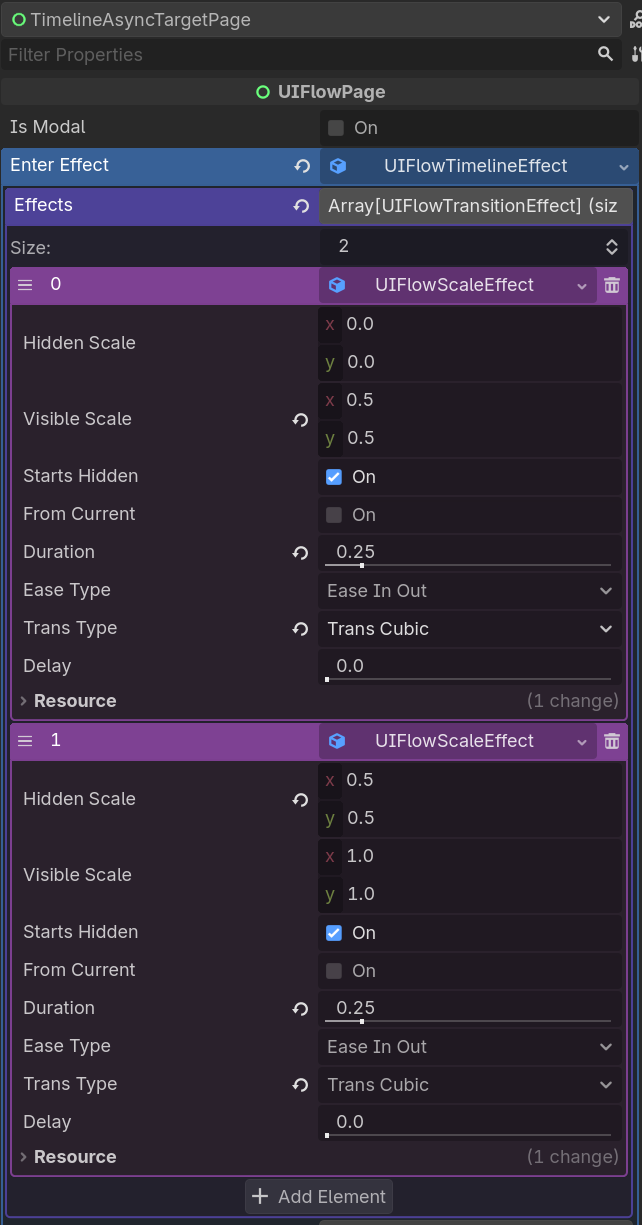
# Configuration:
# Step 0: UIFlowScaleEffect, duration 0.15, from 0.0 to 0.5, punch-out curve
# Step 1: UIFlowScaleEffect, duration 0.15, from 0.5 to 1.0, punch-out curve
This makes the page scale quickly to 0.5, then bounce to full size for a punch-elastic feel.
Async Flow
You can await UIFlow animations directly inside a page:
func _play_open_sequence() -> void:
    await UIFlow.Animator.tween(self, UIFlowTweenProp.MODULATE, Color.WHITE, 0.2).finished
    await UIFlow.Animator.tween(self, UIFlowTweenProp.SCALE, Vector2.ONE, 0.3).finished
    _enable_input()
Combining with Navigation
func _on_start() -> void:
    await UIFlow.Animator.tween(self, UIFlowTweenProp.OPACITY, 0.0, 0.2).finished
    UIFlow.push(GamePage)
Async Navigation and Loading Pages
For large scenes, use push_async() to load the scene on a background thread instead of blocking the frame:
push_async_with_loading() shows a loading page while the target scene loads, then swaps it for the target automatically:
# Explicit loading page:
await UIFlow.push_async_with_loading(WorldPage, {"level": 3}, null, MyLoadingPage)

# Or configure a default once (used when the parameter is omitted):
UIFlow.Config.loading_page_class = MyLoadingPage
await UIFlow.push_async_with_loading(WorldPage)
Progress protocol. If the loading page implements set_progress(float), the navigator forwards threaded load progress (0.0–1.0, always ending at 1.0 — including cache hits):
class_name MyLoadingPage extends UIFlowPage

@onready var _bar: ProgressBar = $Center/ProgressBar

func set_progress(p: float) -> void:
    _bar.value = p * 100.0
Loading pages are ordinary UIFlowPages, so they are fully skinnable — use your theme, transitions, and layout. See AsyncLoadingPage in the free demo (Timeline & Async demo) for a complete example.
Pre-warming. To make the first push instant, preload scenes ahead of time:
Recommendations
- Prefer
UIFlowTimelineEffectresources for complex enter / exit animations. - Use inline
awaitfor quick one-off animations.