Inspector
The GFFPlayer Inspector is a custom panel that replaces the default combo_dictionary property editor. It follows a Unity Feel-style vertical list layout.
Toolbar
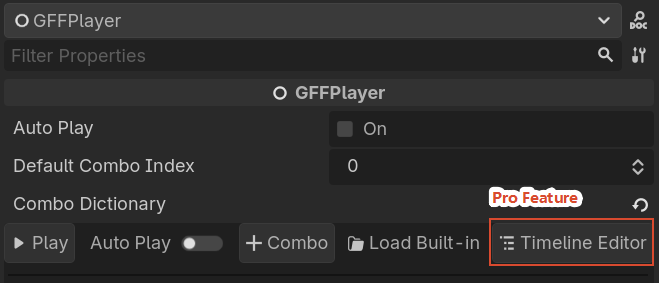
At the top you’ll find:
- ▶ Play: preview the active combo in the scene (stops any running effect first).
- Auto Play: toggle whether the default combo plays automatically when the scene starts.
- + Combo: add a new empty combo.
- Load Built-in: import a built-in combo (
hit_light,explosion,pickup_coin, etc.). - Timeline Editor: open the full Timeline Editor for advanced time-based editing. This button is only visible when Game Feel Flow Pro is enabled.
Combos List
Each combo appears as a row:
- Drag handle for reordering.
- ★ / ☆ default combo toggle. Click the star to mark a combo as the default (
default_combo_index). - Combo key (click to select).
- Duplicate, Rename, Delete icons.
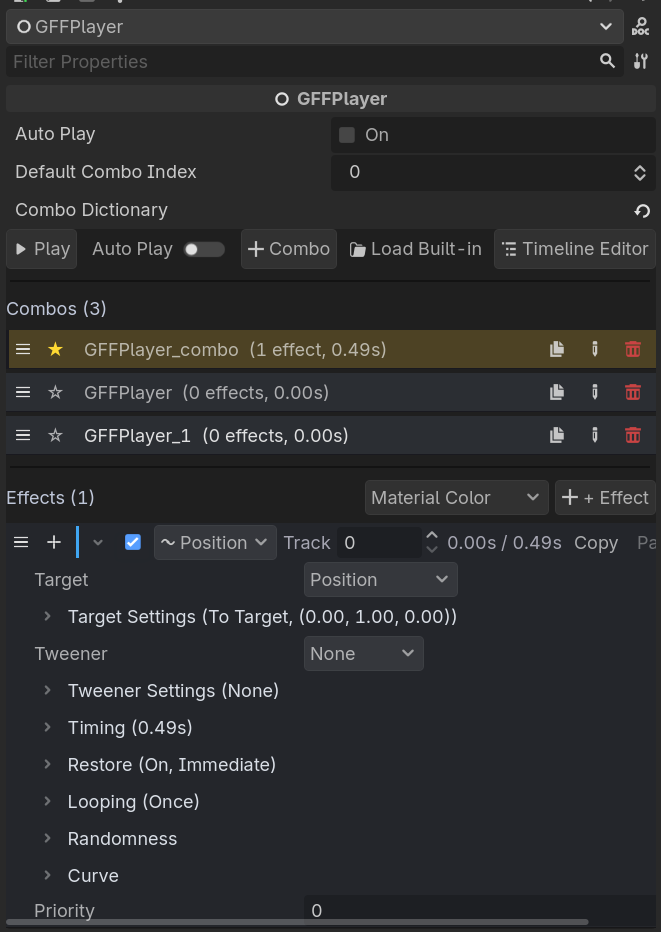
Click a combo to select it. The Effects list below updates to show that combo’s entries.
Effects List
For the selected combo, each effect entry shows:
- Category color bar.
- Expand / collapse toggle.
- Enable checkbox.
- Effect name.
- Start time and duration.
- Delete button.
Expand an effect to edit its parameters inline. Parameters are generated automatically from the effect script’s exported properties.
Undo / Redo
All combo and effect operations support Godot’s native undo/redo (Ctrl+Z / Ctrl+Shift+Z).